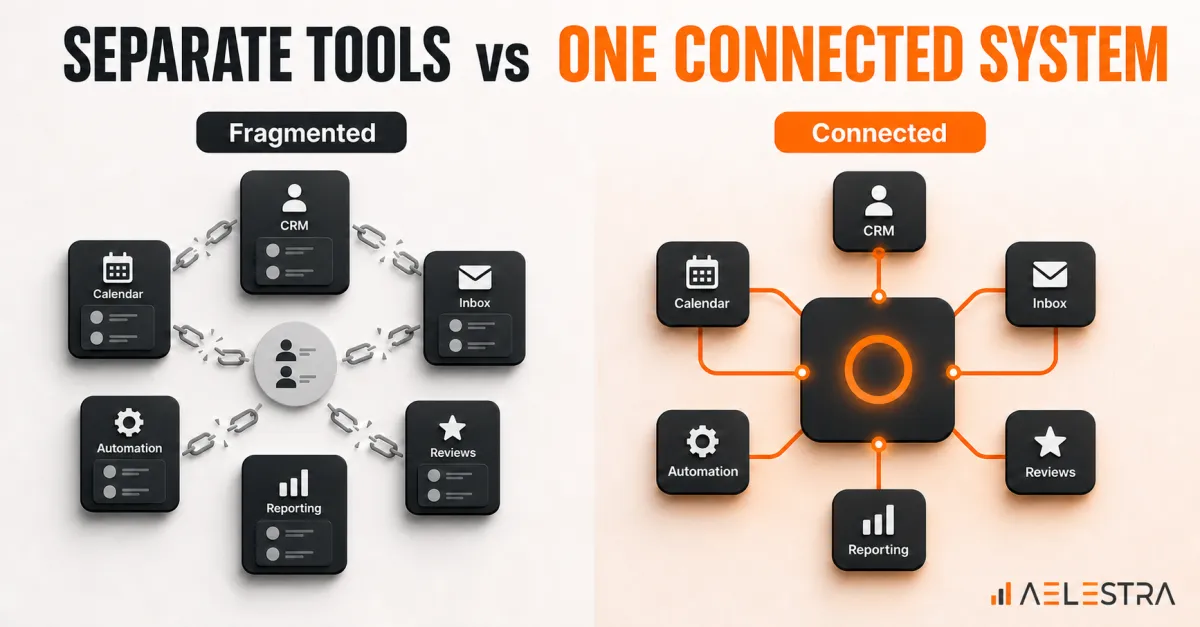
All-in-One CRM vs Separate Tools for Service Businesses
Service businesses often reach a point where their software stack becomes difficult to manage. The CRM stores contacts, a calendar handles appointments, another platform sends messages, a separate tool collects reviews, and reporting lives in several dashboards.
Each tool may work well on its own. The customer journey can still break between them.
An all-in-one CRM brings core customer operations into one system. A separate-tools approach combines specialist applications through integrations. Neither model is automatically right for every business. The better choice depends on workflow complexity, team capacity, integration needs, and the cost of maintaining the system.
What is an all-in-one CRM?
An all-in-one CRM combines several functions around a shared customer record. Depending on the platform, that may include:
Contact and lead management;
Email, SMS, phone, and social messaging;
Sales pipelines;
Forms and landing pages;
Automation workflows;
Reporting.
The main advantage is not the number of features. It is the shared data and workflow layer connecting them.
What does a separate-tools stack look like?
A separate-tools stack uses different products for different jobs. The business may choose a specialist CRM, scheduling platform, help desk, email service, review tool, and analytics product, then connect them with native integrations or automation software.
This approach can provide deeper features in a particular area. It also creates more handoffs, data mappings, subscriptions, permissions, and failure points to manage.
All-in-one CRM: advantages
One customer record: When communication, appointments, opportunities, and follow-up activity share one contact record, staff have more context. Customers are less likely to repeat information.
Fewer integration gaps: Native workflows can reduce delays between an inquiry, CRM update, booking, reminder, review request, and report.
Easier training: Employees can learn one interface and one operating model instead of switching between several systems.
Centralized reporting: A connected platform can make it easier to follow the path from source to lead, appointment, sale, and review.
Simpler administration: There are fewer vendors, billing relationships, user accounts, and integration credentials to maintain.
All-in-one CRM: tradeoffs
Some features may be less specialized: A broad platform may not match the deepest functionality of every dedicated tool.
Platform dependency: Moving many workflows into one system makes vendor selection, data portability, and exit planning important.
Implementation still requires design: An all-in-one platform does not automatically create a good process. Pipelines, permissions, automations, naming rules, and reporting still need to be configured properly.
Separate tools: advantages
Best-of-breed features: A specialist product may offer advanced capabilities for a complex scheduling, support, commerce, or reporting need.
Flexibility: The business can replace one component without migrating the entire operating system.
Team-specific choice: Specialized teams may prefer products designed for their exact role and workflow.
Separate tools: tradeoffs
Integration maintenance: An integration can fail when a field changes, a permission expires, a vendor updates an API, or a workflow is edited. Someone must monitor and repair these connections.
Duplicate and inconsistent data: The same customer can appear differently across systems. Staff may not know which record is current.
Hidden operating cost: Subscription prices are only part of the cost. Add implementation, automation software, support, training, reporting work, and employee time spent switching between applications.
Fragmented reporting: When sources, conversations, appointments, sales, and reviews live in different tools, attribution can become slow or unreliable.
How to compare total cost?
Use a total-cost worksheet that includes:
monthly and annual subscription fees;
implementation and migration;
integrations or automation middleware;
internal administration time;
employee training;
reporting and data cleanup;
support and troubleshooting; and
the cost of missed handoffs or delayed follow-up.
The lowest software price is not always the lowest operating cost.
Seven questions to guide the decision:
How complex are the workflows?
If the business has unusual or highly specialized requirements, separate tools may provide needed depth. If the main need is a reliable inquiry-to-booking-to-follow-up journey, an all-in-one CRM may reduce unnecessary complexity.How many handoffs happen today?
Map every place information moves from one tool or person to another. Frequent manual handoffs are a strong signal that consolidation could help.Who will maintain the stack?
A flexible multi-tool system needs technical ownership. Without it, integrations and data quality usually decline over time.What reporting does leadership need?
Define the decisions the reports must support. If the team needs a clear view from lead source to revenue, confirm that the proposed architecture can produce it reliably.How important is user adoption?
More applications can mean more training, more passwords, and more inconsistent usage. A simpler system may create more value if employees actually use it correctly.What is the exit plan?
Whether you choose one platform or several, document data ownership, export options, integrations, and the process for changing vendors.What can be tested first?
Pilot one complete workflow. For example: new inquiry, automated acknowledgement, qualification, appointment booking, staff follow-up, and review request. Measure the result before expanding.Which option is better for a service business?
An all-in-one CRM is often a strong fit when the priority is consistent follow-up, easier training, shared customer context, and simpler reporting.
Separate tools can be the better fit when the business has specialized requirements, dedicated technical ownership, and a clear reason each additional product improves the customer journey.
The wrong question is, “Which product has more features?” The better question is, “Which operating model gives customers and employees the fewest broken handoffs?”The practical takeaway:
Customers do not experience your CRM, calendar, inbox, automation, and review platform as separate products. They experience one business.
AELESTRA brings customer communication, CRM, booking, automation, reputation, and reporting into a connected system for service businesses. The goal is not consolidation for its own sake. It is a customer journey that moves forward with less delay, less duplicated work, and better context.
Before choosing a platform, map one important customer journey, calculate the full operating cost, and identify who will own the system. That process usually makes the right architecture much clearer.