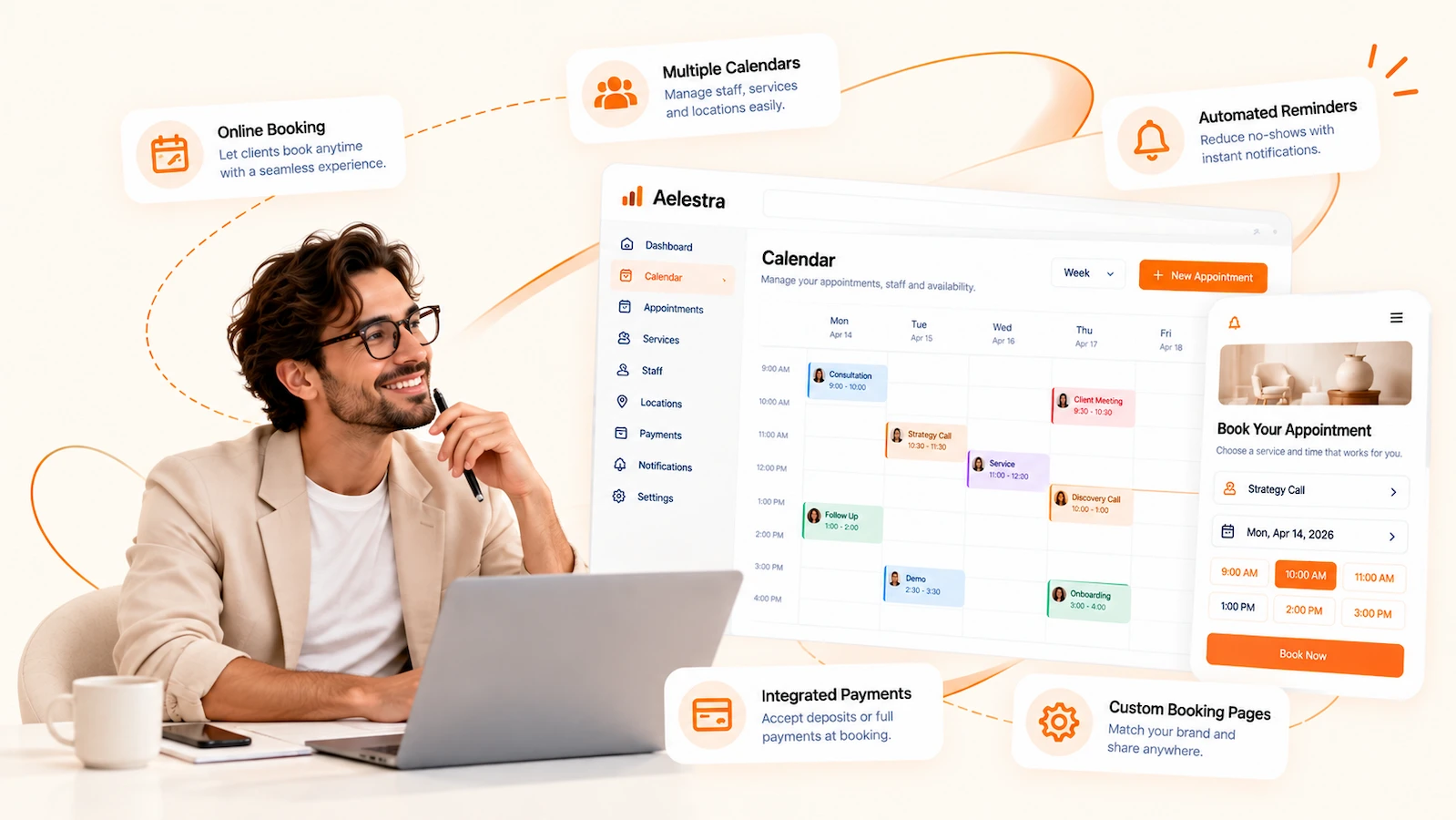
Online Booking & Appointment Scheduling

Make every appointment easier to book, manage and automate from one connected scheduling system.

With AELESTRA, turn online booking and appointment scheduling into a connected customer experience. Manage appointments, services, classes, staff availability, locations and customer bookings from one flexible workspace. Create branded booking pages, manage real-time availability, synchronize calendars and simplify rescheduling while giving customers a convenient way to book online around the clock. Connect scheduling with automated reminders and follow-up, CRM customer records and payment-enabled booking journeys to keep every appointment, customer interaction and next step connected from booking through post-appointment engagement.

AELESTRA online booking and appointment scheduling platform showing calendar management, customer booking pages, staff availability, automated reminders, calendar synchronization and integrated payments
Connected Booking Workspace

Manage every booking from availability to customer follow-up.

Bring scheduling, availability, services and customer bookings together inside AELESTRA. Build a flexible online booking and appointment scheduling system around staff calendars, services, classes, locations, booking pages and real-time availability. Connect every appointment with CRM customer records and booking automation to streamline reminders, confirmations, rescheduling and follow-up while creating a more connected customer journey before and after every booking.

Scheduling & Availability

Control when, where and how every appointment can be booked.

Manage calendars, staff availability, locations and booking rules from one scheduling workspace. Configure personal, round-robin, collective and class-based calendars, define working hours and booking windows, and use availability controls to keep customer scheduling aligned with the way your business operates.

Personal, round-robin, collective and class booking calendars
Staff availability, schedules, locations, time zones and booking rules
Calendar synchronization, booking windows, buffers and availability controls
Services, Booking Pages & Commerce

Turn your services into flexible booking experiences built around your brand.

Create and organize services, classes and rental-based booking experiences while controlling how customers discover and reserve them. Build branded booking pages, customize booking forms and confirmations, connect staff and locations, and support payment-enabled booking journeys from one system.

Service catalogs, categories, classes, rentals, staff and locations
Branded booking pages, custom fields, confirmations and booking widgets
Payment-enabled bookings, pricing settings and configurable customer journeys
Automation & Customer Journey

Keep every appointment connected before, during and after the booking.

Automate the operational steps surrounding every appointment with confirmations, reminders, rescheduling updates, cancellation notifications and post-booking follow-up. Keep appointment activity connected to customer records while coordinating calendars, communications and workflows from one environment.

Automated confirmations, reminders, cancellations and rescheduling notifications
CRM-connected appointment history, customer context and booking activity
Automated follow-up, calendar connections and appointment-triggered workflows
Interactive Booking Product Tour

Explore scheduling, services and availability inside a live booking workspace.

Explore how AELESTRA brings online booking and appointment scheduling, staff availability, services, classes, booking pages, rentals, calendar synchronization, payments and appointment management into one connected workspace. See how scheduling can work together with automated reminders and follow-up and CRM customer records to create a smoother booking journey before, during and after every appointment.

Calendars Manage bookings, services and availability

Appointment Calendar

View scheduled appointments across calendars, staff and services.

Today's Appointments 8 Fictional demo schedule
Available Slots 17 Across active calendars
Confirmed 7 Demo appointments
Pending 1 Awaiting confirmation
October 5 - 9, 2026
MON 5
TUE 6
WED 7
THU 8
FRI 9
9 AM
10 AM
11 AM
12 PM
1 PM
2 PM
3 PM
4 PM
5 PM
6 PM
9 AM 10 AM 11 AM 12 PM 1 PM 2 PM 3 PM 4 PM 5 PM
SUN
MON
TUE
WED
THU
FRI
SAT
27
28
29
30
1
2
3
4
5
10:00 Strategy Consultation
4:00 Project Review
6
12:00 Initial Consultation
7
11:00 Team Workshop
3:00 Follow-up Session
8
2:00 Project Review
9
10:00 Initial Consultation
10
11
12
13
14
15
16
17
18
19
20
21
22
23
24
25
26
27
28
29
30
31

Appointments

Search, filter and manage scheduled customer appointments.

Customer Service Date Time Assigned Staff Status
Taylor Morgan [email protected]
Strategy Consultation Oct 5 10:00 AM Avery Morgan Confirmed
Morgan Ellis [email protected]
Initial Consultation Oct 6 12:00 PM Riley Chen Confirmed
Jamie Parker [email protected]
Team Workshop Oct 7 11:00 AM Avery Morgan Confirmed
Cameron Bell [email protected]
Follow-up Session Oct 7 3:00 PM Jordan Blake Pending
Alex Monroe [email protected]
Project Review Oct 8 2:00 PM Riley Chen Confirmed
No fictional appointments match your current filters.

Calendar Settings

Create different booking experiences for individuals, teams, groups and classes.

○
Personal Booking

One team member, one calendar and direct appointment scheduling.

Active 30 min Online
↻
Round Robin

Distribute appointments across available team members automatically.

Active 3 Staff 60 min
◉
Class Booking

Let multiple customers reserve seats within the same scheduled session.

Active 12 Seats 90 min
◇
Collective Booking

Require multiple team members to be available for the same appointment.

Configured 2 Staff 45 min

Availability

Define reusable working hours and date-specific scheduling overrides.

Used by 4 calendars
Monday
9:00 AM to 5:00 PM
Tuesday
9:00 AM to 5:00 PM
Wednesday
10:00 AM to 6:00 PM
Thursday
9:00 AM to 5:00 PM
Friday
9:00 AM to 3:00 PM
Saturday Unavailable
Sunday Unavailable

Services

Organize bookable services, categories, pricing, staff and locations.

Consultations
Strategy Consultation

A one-to-one discovery and planning appointment with a team specialist.

60 minutes $120
Active
Workshops
Team Workshop

A collaborative group session with configurable capacity and staff assignment.

90 minutes $240
Active
Reviews
Project Review

A focused follow-up appointment for reviewing progress and next steps.

45 minutes $85
Active

Booking Pages

Build branded customer booking experiences for services and locations.

Book Your Appointment

Choose a service and select a time that works for you.

Rentals

Manage bookable inventory, pricing, availability and additional fees.

□
Creative Studio

Flexible studio rental with configurable booking duration and availability.

Hourly $75
Inventory 1 unit
◫
Meeting Room

Reservable meeting space with capacity, time limits and location settings.

Hourly $55
Inventory 2 rooms
◇
Equipment Package

Equipment rental with inventory quantity, pricing and optional additional fees.

Daily $95
Inventory 4 units

Calendar & Meeting Connections

Connect external calendars and meeting tools to coordinate availability.

G
Google Calendar Sync events and use connected calendars to help prevent scheduling conflicts.
O
Outlook Calendar Connect Microsoft calendar events with appointment availability.
iC
iCloud Calendar Add supported calendar feeds to coordinate existing events and availability.
C
Calendly Coordinate scheduling data when migrating or working across booking systems.
V
Video Meetings Associate supported virtual meeting locations with scheduled appointments.
↔
Calendar Sync Import or export calendar feeds for supported external scheduling workflows.

Calendar Feed

Demonstration only. The address below is fictional and does not connect to a real calendar.

https://calendar.example.test/demo-feed.ics

Appointment Notifications

Configure customer and team communication around key booking events.

Booking Requested

Send a notification when a new appointment request is received.

Email SMS Team
Booking Confirmed

Confirm the appointment and share relevant booking details.

Email SMS
Appointment Reminder

Remind customers before the appointment using configured timing.

Email SMS WhatsApp
Appointment Rescheduled

Share updated time and scheduling details after a change.

Email SMS
Appointment Cancelled

Notify the customer and internal team when an appointment is cancelled.

Email Team
Post-Appointment Follow-up

Trigger follow-up communication after the scheduled appointment.

Email SMS Workflow
Demo updated Your simulated action was completed.
AELESTRA Booking Demo Workspace
Wednesday, October 7 4 bookings
Availability
4:30 PM 45 minute slot available
5:30 PM 60 minute slot available
Taylor Morgan Strategy Consultation • Oct 5 • 10:00 AM
Confirmed
Morgan Ellis Initial Consultation • Oct 6 • 12:00 PM
Confirmed
Cameron Bell Follow-up Session • Oct 7 • 3:00 PM
Pending
Strategy Consultation 60 min • $120 • Consultations
Active
Team Workshop 90 min • $240 • Workshops
Active
Project Review 45 min • $85 • Reviews
Active
Customer Preview

Book Your Appointment

Choose a service and select an available time.

Booking Settings
Standard Working Hours Monday to Friday
Google Calendar External calendar connection
Connected
Appointment Reminders Email and SMS
Allow Rescheduling Customer booking controls

This interactive experience demonstrates how AELESTRA can bring appointment scheduling, staff availability, booking calendars, services, classes, booking pages, notifications, calendar connections and online booking management into one connected workspace. Every customer, employee, appointment, service, rental, price, email address, phone number, location, metric and action shown here is fictional demo data. No live customer record, calendar or booking is accessed or changed.

See the Full Platform
BOOKING SYSTEM FAQ

Questions about making appointment scheduling simpler? Start here.

Clear answers about online booking and appointment scheduling software, calendar management, team availability, booking pages, service scheduling, automated reminders, customer records and scheduling automation with AELESTRA.

Frequently asked
8 questions

AELESTRA Booking is a connected online appointment scheduling platform designed to help businesses manage calendars, appointments, services, team availability and customer bookings from one workspace. Instead of treating scheduling as a separate tool, AELESTRA connects booking activity with customer records, communication and automation so teams can manage the full appointment journey with stronger context.

Yes. Businesses can provide customers with branded online booking experiences where they can choose an available service, date and time based on the scheduling rules you configure. Booking pages can be structured around your services and availability, helping customers schedule without repeated manual coordination. This creates a smoother self-service booking experience while keeping each appointment connected to the wider customer journey.

AELESTRA lets businesses define working hours, appointment duration, booking windows, buffers and date-specific availability so customers only see times that fit the rules you set. Team calendars can also be organized around the people responsible for each appointment. This makes calendar management and team scheduling more structured while reducing the manual work required to find mutually available time slots.

Yes. Different calendars can be configured around different scheduling models, services, team members and appointment requirements. Businesses can create one-to-one appointments, distribute bookings across available team members, organize group sessions and configure appointments that require multiple team members. This gives businesses more flexibility to match each booking flow to the way the service is actually delivered.

Yes. Booking activity can work with connected business automation to support confirmations, appointment reminders, rescheduling updates, cancellation notices and post-appointment follow-up. These workflows can reduce repetitive administrative work while helping customers receive the right communication at the right stage of the booking journey. Teams can keep scheduling and follow-up connected instead of managing each step manually.

Yes. Appointments can remain connected to the customer record so your team has better context before and after each scheduled interaction. Instead of keeping booking history isolated from customer information, AELESTRA can bring appointment activity closer to CRM customer data, conversations, opportunities and follow-up. This supports a more complete customer view and makes it easier for teams to understand what has happened and what should happen next.

Booking flows can be configured around the payment requirements of the service, including options where payment or a deposit is collected as part of the scheduling process. This helps businesses connect appointment booking with the commercial side of the customer journey instead of treating payment as a completely separate step. The setup can be adapted according to the service, booking policy and connected payment configuration used by the business.

Yes. Connected calendar tools can help businesses coordinate existing events with appointment availability and reduce the risk of conflicting bookings. Calendar connections make it easier to keep team schedules aligned while still managing customer-facing bookings through AELESTRA. Combined with availability rules, service calendars and booking automation, this creates a more reliable scheduling workflow for both customers and internal teams.

Build a smoother appointment journey by bringing online booking and appointment scheduling, calendar management, team availability, services, reminders, customer data and scheduling automation together inside one connected platform.