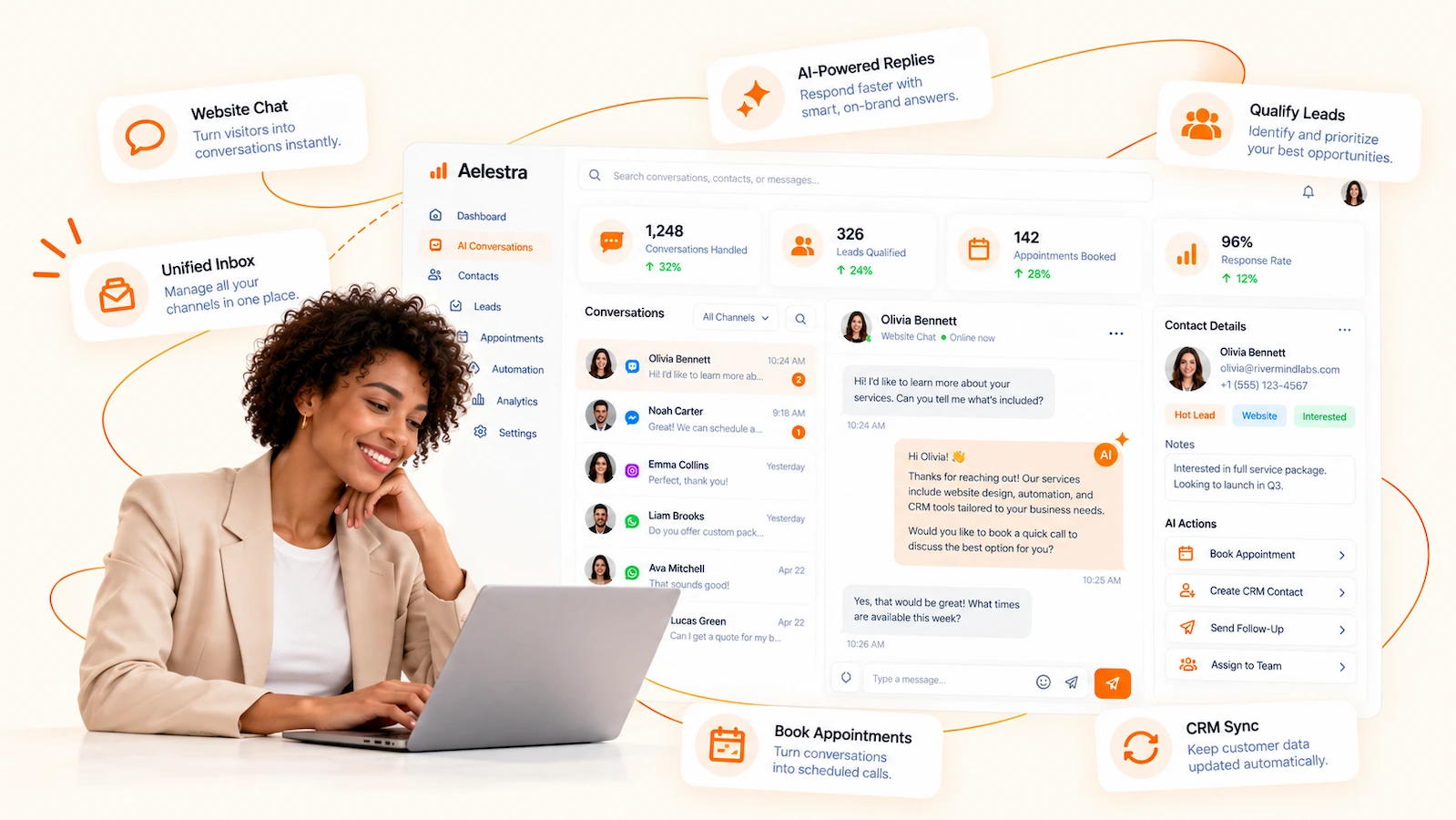
Automate customer conversations,
across every channel.
AELESTRA
brings
conversational AI,
AI chatbots and omnichannel customer messaging into one connected workspace.
Answer questions, qualify leads, automate follow-ups,
book appointments,
update
CRM
data, trigger
workflow automation,
send SMS or WhatsApp actions and route customers to a human when needed.
Build and manage
conversational AI
with
AELESTRA.
Connect omnichannel customer messaging, business knowledge,
CRM data,
appointment booking
and
workflow automation
so conversations can move naturally from a customer question to qualification,
follow-up, booking, human support or the next business action.
01
Omnichannel Conversations
Speak every customer’s language.
Deploy conversational AI across your customer messaging channels
with prompts, business context and configurable AI models.
The AI can respond in more than 120 languages, adapting to the
customer’s language for more natural and accessible conversations.
AI-powered customer conversations across connected messaging channels
Automatic responses in 120+ languages based on the customer’s language
Configurable AI models, prompts, business context and conversation behavior
02
Actions & Handoff
Move conversations forward.
Turn customer messages into connected business actions.
Qualify leads, update contact information, book appointments,
trigger workflows, call APIs, automate follow-up or transfer the
conversation to a human when personal support is needed.
Lead qualification, CRM updates and appointment booking
Workflow triggers, API actions and automated follow-up
Human handoff, agent transfer and conversation routing
03
Knowledge & Control
Keep every reply on context.
Ground your AI in business knowledge from websites, FAQs,
files, tables and structured information. Test conversations,
control automated behavior, generate summaries and review
conversation activity to continuously improve customer interactions.
Knowledge bases from websites, FAQs, files, tables and rich content
Agent testing, Auto-Pilot controls and conversation settings
Conversation summaries, activity visibility and performance insights
Interactive Conversational AI Tour
Explore conversational AI in an
interactive workspace.
See how
AELESTRA
brings
conversational AI,
omnichannel messaging, business knowledge,
CRM automation,
appointment booking
and
workflow automation
in one connected customer conversation workspace.
Automate qualification, follow-up, human handoff and business actions
while responding in more than 120 languages according to each customer’s language.
Interactive product simulation
Fictional demo data only
A
Northstar Services
Demo workspace
Search workspace
Conversation AI
Build, test and manage AI-powered customer conversations
Conversations
1,284
Fictional activity
Actions Triggered
426
Example automation
Appointments
118
Simulated bookings
Languages
120+
Customer language support
Conversation activity
Fictional last 7 days
Mon
Tue
Wed
Thu
Fri
Sat
Sun
Recent outcomes
Demo data
✓
Appointment booked
Website conversation
4m
CRM
Contact updated
Lead qualification
12m
FR
French response
Language adapted automatically
18m
H
Human handoff
Support request escalated
27m
Agent
Channels
Status
Mode
Goal
CS
Customer Service Assistant
Customer support & booking
Web Chat
WhatsApp
Active
Auto-Pilot
Answer & assist
•••
LQ
Lead Qualification Assistant
Qualification & CRM
Instagram
SMS
Active
Auto-Pilot
Qualify leads
•••
AC
Appointment Coordinator
Scheduling & follow-up
Web Chat
WhatsApp
Active
Auto-Pilot
Book appointments
•••
AH
After Hours Assistant
General inquiries
Web Chat
Draft
Manual
Answer & handoff
•••
Knowledge Base
Connect approved business information to your conversational AI.
Company Website
Fictional service pages, policies and customer information.
24 pages
Ready
Customer Service FAQ
Structured answers for frequently asked customer questions.
18 answers
Ready
Service Guide
Fictional uploaded reference material used by the demo assistant.
File
Ready
Service Information
Structured fictional information for services and internal reference.
14 rows
Ready
Multilingual Knowledge Retrieval
The conversational agent can use connected knowledge while adapting its response to the customer’s language.
Automatic Language Adaptation
Respond in more than 120 languages according to the customer’s language.
Conversation Activity
Review fictional conversation outcomes, languages and automated actions.
Customer Service Assistant
Demo contact 1042
Web Chat
English
4m 12s
Conversation
Booked
Today
11:18 AM
Lead Qualification Assistant
Demo contact 1038
WhatsApp
French
3m 06s
Conversation
Handoff
Today
10:04 AM
Appointment Coordinator
Demo contact 1033
Instagram
Spanish
2m 48s
Conversation
Booked
Yesterday
4:46 PM
Customer Service Assistant
Demo contact 1029
SMS
Arabic
2m 21s
Conversation
Follow-up
Yesterday
2:13 PM
Customer Service Assistant
Demo configuration • Changes are simulated
Agent Details
Configure the core behavior of this fictional conversational AI agent.
Basic Configuration
Define the agent name, purpose and language behavior.
Opening Message
Set the initial message for supported messaging channels.
Agent Prompt
Define how the agent should communicate, reason and follow your business rules.
Business Instructions
This fictional prompt demonstrates the configurable instructions available to the agent.
Conversation Principles
Detect Customer Intent
Understand the request before moving the conversation forward.
Match Customer Language
Respond in more than 120 languages according to the customer's language.
Ask One Question at a Time
Keep automated conversations clear and natural.
Conversation Actions
Connect customer conversations with business actions and automation.
✓
Book Appointment
Use connected scheduling availability during a customer conversation.
✓
Update Contact
Save configured customer information to CRM contact fields.
✓
Trigger Workflow
Start an automation based on customer intent or conversation context.
✓
Custom API
Connect a configured external business action or data source.
✓
Human Handoff
Transfer the conversation to a human team member when needed.
✓
Send Follow-Up
Continue the customer journey through configured messaging.
✓
Transfer to Another Bot
Route the conversation to another configured AI experience.
✓
Stop Automation
Stop automated replies when configured completion conditions are met.
Knowledge
Select the approved business information available during customer conversations.
Connected Knowledge
Company Website
24 fictional pages connected
Ready
Customer Service FAQ
18 fictional answers
Ready
Service Guide
Uploaded demo file
Ready
Knowledge Controls
Use Knowledge Base
Reference connected business knowledge before answering.
Track Knowledge Gaps
Identify questions not fully covered by connected information.
Auto-Pilot
Control when AI can respond automatically and when your team should take over.
Automated Conversations
Enable Auto-Pilot
Allow configured AI responses on assigned channels.
Pause After Human Reply
Stop automated responses after a team member enters the conversation.
Resume Automatically
Resume automation based on configured conversation conditions.
Escalation Behavior
Configure situations where human support should be offered.
Response Timing
Fine-tune conversation pacing for a more natural customer experience.
Conversation Timing
Conversation Summaries
Configure what happens after a customer conversation.
Generate Conversation Summary
Create a structured summary after the conversation.
Save to CRM
Store configured conversation information with the contact.
Trigger Follow-Up Workflow
Continue the customer journey after the conversation.
Notify Team
Notify the appropriate team when configured conditions are met.
Messaging Channels
Choose where this conversational AI experience is available.
Web Chat
Website customer conversations
WhatsApp
Connected WhatsApp conversations
Instagram
Connected social messaging
SMS
Connected text conversations
Language Adaptation
One agent can support multilingual conversations across assigned channels.
Respond in Customer Language
Automatically adapt responses across more than 120 supported languages.
Create Conversation AI Agent
Choose how you want to start this fictional demo agent.
Add Knowledge Source
Choose a fictional source type for this product simulation.
Custom API Action
Fictional API configuration. No external request is sent.
Test Conversation AI
Run a fictional conversation without contacting a real customer or messaging channel.
Customer Language
Test how the agent adapts to the language used by the customer.
AELESTRA Conversation AI can be configured to respond in more than 120 languages according to the language used by the customer.
Connected Demo Actions
CRM
Booking
Workflow
Human Handoff
Customer Service Assistant
Fictional live simulation
✓
Demo action completed.
Conversation AI
Interactive demo workspace
Conversations
1,284
Actions
426
Appointments
118
Languages
120+
Automatic Language Detection
Match the customer’s language
Auto-Pilot
Automated conversation handling
Human Handoff
Transfer when needed
Customer Service Assistant
Web Chat • WhatsApp
Active
Auto-Pilot
120+ languages
Lead Qualification Assistant
Instagram • SMS
Active
CRM connected
Qualification
Appointment Coordinator
Web Chat • WhatsApp
Active
Booking
Follow-up
Book Appointment
Connected scheduling action
Update CRM
Contact and field updates
Trigger Workflow
Continue automation
Human Handoff
Escalate to your team
Custom API
Connected business action
Customer Service Assistant
Fictional simulation
This interactive experience demonstrates how AELESTRA can connect conversational AI,
multilingual customer messaging, business knowledge, lead qualification,
CRM updates, appointment booking, workflow automation, API actions,
human handoff and conversation summaries in one workspace.
Every company, agent, contact, message, conversation, appointment, metric and action shown above is fictional demo data.
No live customer record, message, booking, API request or external system is accessed, contacted, created or changed.
Clear answers about
conversational AI,
AI chatbots, omnichannel customer messaging,
multilingual conversations, lead qualification,
CRM automation, appointment booking, workflow automation
and human handoff with
AELESTRA.
Frequently asked
8 questions
AELESTRA AI Conversation
is a conversational AI platform for automated customer
conversations across connected messaging channels. Businesses
can configure AI agents with business context, prompts, knowledge
sources, routing rules and connected actions so conversations can
answer questions, qualify leads, update customer data, book
appointments, trigger workflows and hand off to a team member
when needed.
AELESTRA AI Conversation is designed for omnichannel customer
messaging across supported web, messaging and social conversation
channels. A business can assign AI agents to selected channels,
apply routing conditions and manage customer conversations from
one connected workspace. This helps create a more consistent
customer journey instead of managing each channel as a separate
conversation system.
Yes. AELESTRA AI Conversation can respond in more than
120 languages according to the language used by the customer.
This allows the same conversational AI experience to support
multilingual customer service, lead qualification and automated
follow-up without forcing every customer into one default
language.
Yes. Conversation AI agents can be configured to collect the
information required for the current customer journey, qualify
leads and update selected
CRM customer data
from the conversation. This keeps customer information connected
to the wider sales and service workflow and reduces the need to
manually re-enter details after each interaction.
Yes. AI Conversation can connect customer messages with
AELESTRA appointment scheduling
and configured
workflow automation.
Depending on the setup, an agent can move a customer toward an
available appointment, trigger follow-up processes, update contact
information or launch other connected actions directly from the
conversation.
Yes. Agents can use connected knowledge bases built from
business sources such as website content, FAQs, structured
tables, rich text and uploaded files. This gives the AI a defined
information source for customer questions. Teams can also test
knowledge retrieval and review gaps to improve the information
available to the agent over time.
Yes. Human handoff can be included in the conversation logic so
an AI agent can route the customer to a team member when the
situation requires human support. Routing can work alongside
configured conversation rules, channel assignments and automated
follow-up, helping businesses combine AI automation with human
service instead of forcing every conversation to remain automated.
Yes. Teams can test conversational AI behavior before wider
deployment and review conversation activity, transcripts,
summaries and triggered actions. This provides visibility into
how agents are responding, which workflows are being activated
and where prompts, knowledge or routing rules may need refinement.