Chat Widgets

Turn every website visit into a conversion-ready conversation.

With AELESTRA, launch branded website chat widgets that support conversational marketing, real-time customer engagement, lead capture and faster qualification. Connect each conversation with your CRM, route follow-up through automations and create a more connected digital customer journey with forms and high-converting website experiences.

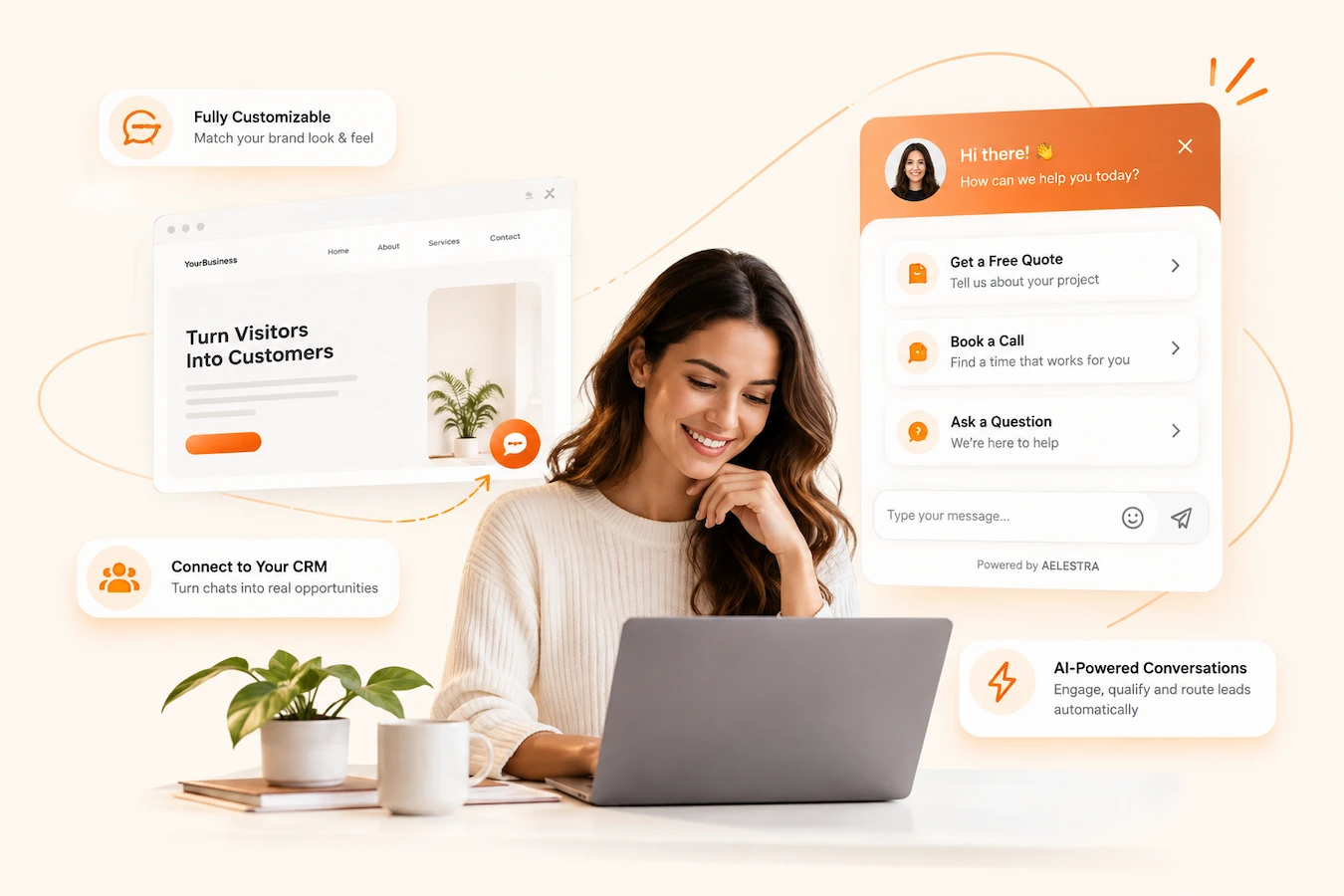
AELESTRA Chat Widgets showing a branded website chat widget, instant support options, CRM-connected lead capture and AI-powered conversations
Conversational Engagement Workspace

Engage, qualify and connect every website conversation.

Build a complete conversational experience inside AELESTRA. Bring live chat, SMS and email, WhatsApp, Facebook, Instagram and voice conversations into configurable website chat widgets. Customize the customer experience, guide visitors to the right channel and turn real-time engagement into useful context for your CRM and connected automation workflows.

Channels & Conversations

Give every visitor the right way to start a conversation.

Create an all-in-one chat experience or launch dedicated channels based on how your customers prefer to communicate. Combine live website chat with SMS and email, WhatsApp, Facebook, Instagram and voice experiences from one flexible conversational entry point.

All-in-one chat across live chat, SMS, email, social and voice
Dedicated WhatsApp, Facebook and Instagram chat experiences
Live chat powered by your team or Conversation AI
Brand & Experience

Shape every detail around your brand and customer journey.

Customize themes, colors, chat icons, greetings and the complete visitor-facing experience. Configure live chat states, business hours, multilingual messaging and return-visitor greetings, then preview the widget across desktop, tablet and mobile before launch.

Themes, custom colors, chat icons and responsive previews
Welcome messages, return-visitor greetings and chat state messaging
Business hours, language selection and configurable chat settings
AI & Deployment

Add intelligent assistance and launch conversations anywhere.

Connect a Voice AI agent for automated visitor assistance and configure acknowledgements, feedback messaging and spam protection around the conversation. When the experience is ready, deploy your widget to WordPress or install it using the generated website code.

Voice AI agent selection for automated visitor conversations
Acknowledgements, feedback messaging and spam protection
WordPress installation or embeddable website code
Interactive Product Tour

Explore Chat Widgets inside a live demo experience.

Create an , choose how customers can connect, customize the experience, configure and connect . This interactive AELESTRA workspace lets you try the workflow before seeing the full platform.

Chat Widgets

Create your first chat widget

Add chat, messaging and AI options to your website from one customizable customer experience.

Name Updated on Chat type
◫ Website Chat Widget
Just now All-in-one chat
A few seconds ago
Chat widget 1
A
Have a question? Our support team is ready to assist you with any questions
A
Choose a chat option to get started.
Hi there. How can we help today?
AI
AELESTRA Support Agent Customer Support Agent
◉
Continue the conversation

This option connects the visitor with your selected messaging channel.

Powered by AELESTRA
Demo updated Your simulated setting was updated.
Chat widget 1 Interactive builder
A
Have a question?
Choose a chat option to get started.

Theme

Change the widget color and see the preview update instantly.

Available channels

Your all-in-one widget can combine multiple customer communication channels.

Live SMS / Email Voice AI Facebook Instagram

Chat window title

Initial message

Return visitor greeting

Voice AI

Connect an AI agent to the Voice option inside your widget.

Agent description

This interactive experience demonstrates how AELESTRA Chat Widgets can be created, customized and connected to messaging and AI channels. All settings and conversations remain inside this simulated product tour and do not affect a live account.

See the Full Platform
Chat Widget FAQ

Questions about connecting with website visitors? Start here.

Clear answers about website chat, live conversations, contact capture, connected communication channels, customization and AI-powered customer interactions with the AELESTRA Chat Widget.

Frequently asked
8 questions

The AELESTRA Chat Widget gives website visitors a direct way to connect with your business without leaving the page. You can configure the experience around live chat, messaging, contact capture, supported communication channels and AI-powered interactions while keeping those conversations connected with the wider customer journey.

Yes. You can build a connected chat experience around the communication options that make sense for your business. Depending on your setup, the widget can guide visitors toward channels such as live chat, messaging, email, WhatsApp, Facebook, Instagram or AI-powered voice conversations from one customer-facing entry point.

Yes. You can customize elements such as the widget color, chat icon, welcome message, conversation prompts and customer-facing text. This allows the widget to feel like a natural part of your website rather than a disconnected third-party tool.

Yes. The widget can provide visitors with a direct path into live conversations with your business. Your team can continue the interaction from the connected AELESTRA workspace, helping keep website inquiries, customer details and follow-up together instead of splitting them across separate systems.

Yes. The chat experience can work alongside AELESTRA AI Agents to support customer interactions before a team member needs to step in. Depending on the experience you configure, AI can help answer questions, guide the conversation and support voice or chat-based customer journeys while keeping the interaction connected to your business workflow.

Yes. You can configure the conversation experience to collect relevant information such as a visitor's name, phone number or email address when appropriate. That information can then remain connected to the customer record, giving your team better context for future communication and follow-up.

Yes. The widget can be configured to fit the customer experience you want to create. You can use a floating chat experience that remains accessible as visitors move through the page or place the experience directly inside page content when a more integrated presentation makes sense.

Website conversations do not need to live in an isolated chat application. Customer information and interactions can stay connected with your CRM, unified conversations and automation workflows. This helps your business move from the first website question to follow-up, qualification, booking and the wider customer relationship inside one connected system.

Give every website visitor a clearer path to your business while keeping conversations, customer context and follow-up connected inside one platform.